
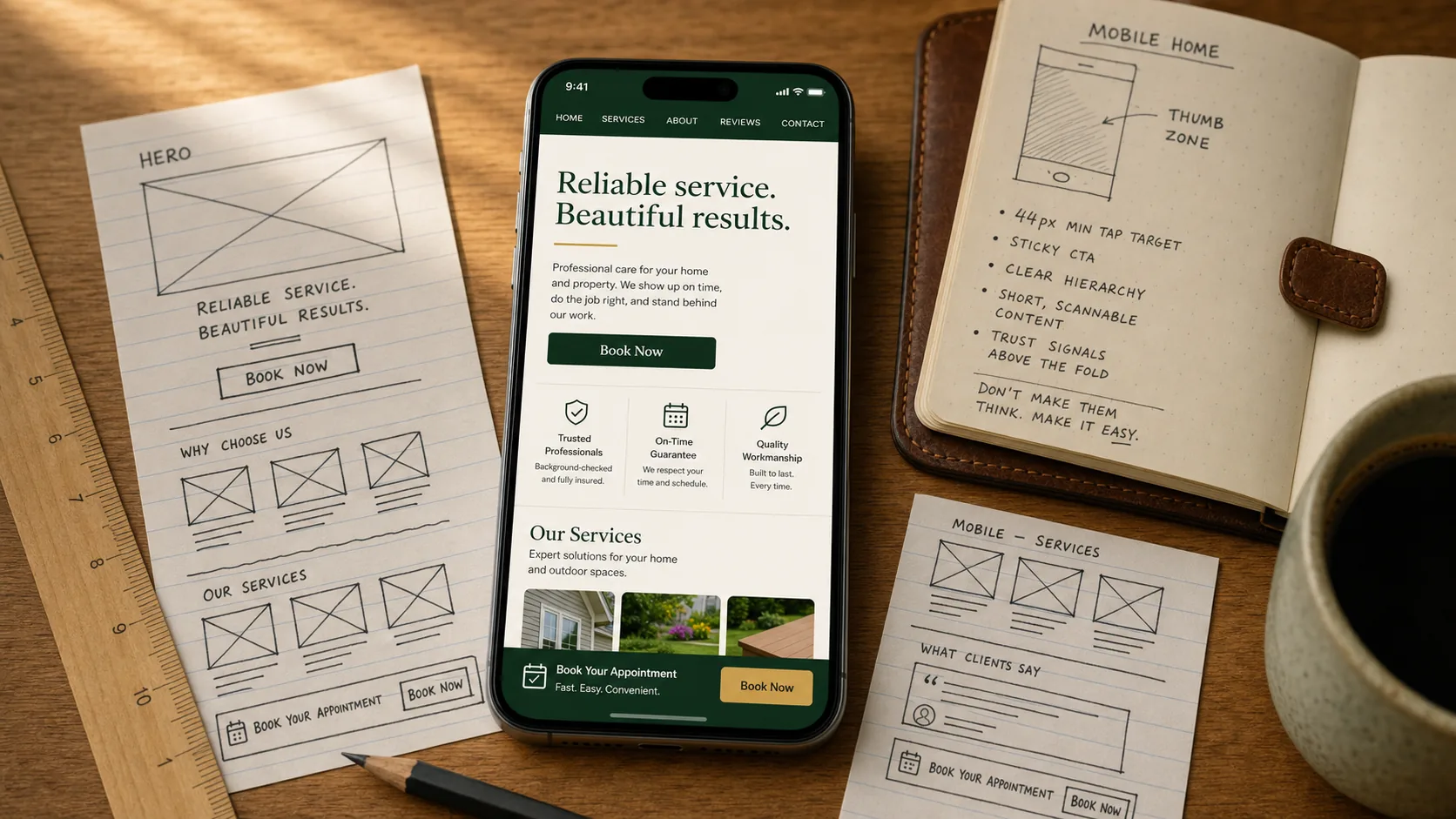
Your customer does not have a desk. They have a phone in their hand, one foot in whatever they have to do next, and seven seconds to decide if you can help them. The website that wins their booking is the one designed for that exact moment.
Most service business websites are not. They were built on a designer's 27-inch monitor, then "made responsive" so they shrink to fit a phone screen. That is not the same thing as designed for a phone. The difference shows up in your booking numbers.
This is the short playbook for actually building mobile-first.
"Mobile-first" is a design philosophy, not a checkbox
There are two ways to make a website work on a phone.
Responsive design starts with a desktop layout and shrinks everything down. The site technically loads on a phone, but the buttons are tiny, the sidebars stack awkwardly, and the call-to-action ends up below the fold. Most cheap templates are responsive.
Mobile-first design starts with the smallest screen and adds complexity up to desktop. The hero, the booking button, and the phone number are sized for a thumb on a phone in a parking lot. The desktop version is a generous expansion of that, not the other way around.
The two strategies produce very different sites for service businesses. Mobile-first wins because that is where your customer actually is.
The mobile patterns that actually move bookings
A mobile-first service business site does these things well:
- Tap targets are at least 44 pixels. Apple's accessibility guidance, but it also matches what real thumbs need. Anything smaller and the wrong button gets tapped.
- Phone numbers are click-to-call. Every visible phone number wrapped in a
tel:link so tapping it opens the dialer. This single fix recovers customers most sites lose silently. - There is a sticky bottom CTA on every page. A single "Book Now" or "Get a Quote" button glued to the bottom of the screen, always visible, always one tap away. Our own site uses one. Most cheap sites do not.
- The most important action sits in the thumb zone. The bottom third of the screen is where the thumb naturally lands when holding a phone one-handed. Put your primary CTA there, not the top.
- One primary action above the fold. Not three buttons, not a hero with two competing CTAs. One thing the customer should do, made obvious.
- Body text is at least 16 pixels. Anything smaller and the customer is squinting or pinch-zooming. They will not.
- The page is usable in under three seconds on 4G. Not just loaded, actually usable. Anything slower and customers leave before they see your hero.
If your current site is missing more than two of these, you are quietly losing customers in the moment they were ready to book.
Common mobile mistakes
The five we see most often when we audit cheap sites:
- Desktop layouts crushed into phone width. Side-by-side feature grids that stack into a 3-screen scroll on a phone. Customers bail at screen two.
- Tap targets sitting on top of each other. Two buttons spaced 10 pixels apart. The wrong one gets tapped. The customer gets frustrated.
- Body copy at 12 pixels. Looks fine on a 27-inch monitor. Unreadable on a phone without zooming. Half of customers do not zoom, they leave.
- Forms with the wrong keyboard type. Email fields that open the alphabetic keyboard instead of the email-specific one. Phone fields that open letters instead of numbers. Every extra tap is friction.
- Popups that take over the whole screen on mobile. Newsletter signups, cookie banners, age-gates that cover everything with no visible close button. Google penalizes these. Customers leave even faster.
We covered the diagnostic version of this in our post on 5 signs your website is hurting your business. Mobile failure is one of the most common ones.
How to test your own site (in under 5 minutes)
The fastest way to know if your site is mobile-first or just "mobile-tolerant":
- Open your homepage on your actual phone. Not the responsive emulator in Chrome devtools. Your real device, on your real cellular connection.
- Hold the phone one-handed. Try to reach the primary CTA with just your thumb. If you have to switch hands or stretch, it is too high on the screen.
- Tap your phone number. Did your dialer open? If not, fix that today.
- Try to book an appointment. Count the taps. More than 5 is too many.
- Time it. From landing on the homepage to completing the goal action, the whole thing should take under 90 seconds. If it takes longer, customers are abandoning.
If you fail two of these, your site is the problem. We also covered the booking-flow piece in detail in our post on picking an online booking system that works.
FAQ
What percentage of service business traffic is mobile?
For most local service businesses, between 65 and 85 percent. Trades and emergency services skew higher (someone in a hurry is on their phone). B2B services skew slightly lower.
Is responsive design enough?
No. Responsive means the site does not break on a phone. Mobile-first means it was designed for one. Customers can feel the difference even if they cannot articulate it.
Should I have a separate mobile site?
No. Separate mobile sites split SEO authority and create maintenance overhead. A single mobile-first responsive site is the standard.
What if most of my bookings happen by phone call?
Even more reason to be mobile-first. Customers on phones who can tap your number get connected immediately. Customers on phones who cannot have to do extra steps and frequently abandon.
How can I tell if my current site is mobile-first or just responsive?
Run the 5-minute test above. Mobile-first sites pass all five. Responsive sites usually fail at least two.